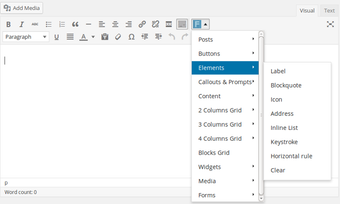
Shortcodes to Insert ZURB Foundation Components in Classic Editor
WP Foundation Shortcodes by Adam Pery is a WordPress plugin that connects the ZURB Foundation front-end framework to the post editor. It maps Foundation's responsive UI elements into editor shortcodes so authors can add framework components without manual HTML. The plugin included grid, button, alert, visibility, typography, and list shortcodes for editor insertion. It targeted WordPress developers and site administrators using Foundation themes who need faster, editor-level placement of framework components for responsive layouts and reduced HTML errors in posts.
Who the plugin was built for and the workflow gap it addressed
Targeted users included developers and administrators running Foundation-based themes who prefer editing content inside the editor rather than editing theme templates. The tool provided a way to place framework components directly in post content, and the author aimed to reduce manual markup mistakes, which the project description lists as a primary benefit for sites using Classic editor workflows.
What level of control it offered over framework elements
Editor-level control let content makers apply framework behavior without switching to HTML mode, shortening the path from idea to published layout. The implementation mapped framework classes into reusable shortcodes, which enabled component-level decisions such as responsive visibility and component variants from within the editor interface, removing the need to hand-write classed containers in many cases.
How it fit into daily use and setup for Classic editor sites
Integration with the Classic editor kept the workflow inside the familiar post screen: shortcodes were inserted where authors needed them and parsed at render time. The plugin's design focused on editor insertion rather than runtime background services, so the user interaction model centred on content editing rather than separate configuration panels or external tooling.
Compatibility window and maintenance considerations for site owners
Compatibility limits included support targeted at Foundation 5 and Foundation 6 components and compatibility with WordPress releases active beforeThe developer positioned the tool for the Classic Editor era, so adoption on sites that have migrated to block-based editing required additional testing or alternate solutions.
Practical for maintained Classic Editor sites, but requires a migration plan
WP Foundation Shortcodes is a practical option for administrators who keep Classic editor workflows and rely on Foundation-based themes and components. Because the plugin was permanently closed on the WordPress.org repository, site owners should plan to replace or reimplement its shortcodes in theme code or choose a currently maintained integration to avoid future compatibility gaps.
Pros
Maps ZURB Foundation classes to easy editor shortcodes
Reduces manual HTML errors when assembling responsive layouts
Supports Foundation 5 and Foundation 6 component sets
Cons
Designed for the Classic Editor, not the block-based editor
Primarily compatible with WordPress releases active prior to 2019
Permanently closed on the WordPress.org plugin repository
Laws concerning the use of this software vary from country to country. We do not encourage or condone the use of this program if it is in violation of these laws. Softonic may receive a referral fee if you click or buy any of the products featured here.